

Business Phone Systems
Cloud phone service, set up and supported in Louisville, Kentucky since 2014
Smart Life sets up and supports cloud phone systems for businesses in Louisville, the surrounding Kentucky counties and Southern Indiana. The service is Elevate, a cloud phone and collaboration platform: desk phones, a desktop and mobile app, auto attendants, voicemail to email, texting, video meetings and call recording, billed per user with no phone system hardware to maintain in your building.
What you get from us is the local part. We check that your network is ready for voice, move your existing phone numbers, build your call flow, install the desk phones, connect overhead paging and door intercoms where you have them, train your staff, and stay your point of contact afterward.
What every user gets
- Desktop and mobile apps, so a call rings wherever the person is working
- Local and long-distance calling
- Voicemail with written transcripts
- Call recording, automatic or on demand
- Hold, transfer, park and pickup
- Paging groups and call pickup groups
- Call history and call-quality reporting
- Setup, number transfer and support from Smart Life
Add what each person needs
Service is per user, and people in the same office can be on different plans. A lobby phone does not need what a sales desk needs. We match each person to the lowest plan that covers what they use.
Team chat and video meetings
One-to-one and group chat with file sharing, plus video meetings with screen sharing and recording.
Business texting
Text customers from a business number instead of a personal mobile phone.
AI call and meeting summaries
A written recap after a call or meeting, with a transcript and the topics covered.
CRM integration
Click to call and screen pops in Salesforce, Microsoft Dynamics 365, NetSuite, ServiceNow, Zendesk and others.
Call queues and reporting
Queues, wallboards, scheduled reports and supervisor listening for teams that take calls all day.
Built-in AI assistant
An assistant inside the desktop and mobile app for drafting messages, summarizing information and answering questions, without leaving the app.
Video meeting rooms
Start or join a scheduled meeting from a tablet in the conference room, using standard room cameras and speakers.
Fax and file storage
Send and receive faxes without a fax line, and keep shared files backed up.
Options for the whole company
- Auto attendant with menus and business-hours rules
- Ring groups for departments
- Texting from your main business number
- Toll-free numbers
- AI receptionist that answers, handles common questions and routes the call
- Fax lines and connections for existing fax machines
- Connection to overhead paging and door intercoms
- Longer call-recording retention and archiving for compliance
Phones and devices
We supply and install the phones, or staff can work from the apps alone. Tell us how each person works and we will recommend a model.
Desk phones
Color-screen models from entry level to touchscreen, with Wi-Fi and Bluetooth options and side modules for a front desk.
Cordless handsets
For shop floors, warehouses and anyone who is rarely at a desk.
Conference phones
For meeting rooms, sized to the room.
Headsets and adapters
Wired and wireless headsets, plus adapters that keep a fax machine, door phone or paging system working.
How the move works
Check the site
We confirm the service address, review your current phone numbers and test your network for voice quality before anything is ordered.
Quote and order
You get a written quote to review and sign electronically. Nothing changes on your current phones until you approve it.
Build the account
We set up your locations, users, auto attendants and ring groups, order any new numbers and schedule the transfer of your existing ones.
Install and train
We install the desk phones, set up the desktop and mobile apps, and show your staff how to use them.
Support
Adds, moves and changes come to us, and we stay your point of contact with the provider.
Phone terms explained
Auto attendant. The recorded menu that answers and lets callers choose a department or person.
Ring group (hunt group). One number that rings several people, all at once or in an order you choose.
Call queue. Holds callers in line with music or messages until someone is free.
Call park. Puts a call on hold so that anyone can pick it up from another phone.
Call flip. Moves a live call from your desk phone to your mobile phone, or back, without hanging up.
Presence. Shows whether a co-worker is available, on a call or away.
Voicemail transcription. Turns a voicemail into text you can read in the app or by email.
Related reading: Copper phone lines are being retired: what to do about fax, alarm and elevator lines
Data sheets
Printable sheets on the plans, features and phones. Each opens as a PDF.
Plans and features
- Plans comparedWhat each plan includes, feature by feature. Plans can be mixed within one company.
- Plans for Microsoft Teams usersThe same comparison for companies that place calls inside Microsoft Teams.
- Phone system features explainedPlain-language definitions of the terms you will see when comparing phone systems.
- Mobile appCalls, chat, texting and meetings on a mobile phone, showing your business number.
- Business textingSend and receive texts and pictures from a company number, shared by a team.
- Online faxSend and receive faxes by email or the web, without a fax line.
- Toll-free numbersHow toll-free numbers and bundled minutes work.
- Video meeting roomsOne-touch video meetings in a conference room, using standard room equipment.
- Hybrid workWhat a phone and collaboration system needs for staff who split time between office and home.
- AI assistantA built-in assistant for drafting, summarizing and answering questions inside the app.
- AI agents and assistantsHow AI answers and routes calls, and assists staff during the day.
- Contact center and CRM integrationsClick-to-call, screen pops and call logging in common business applications.
- Phone system and contact center togetherOne application for staff collaboration and for teams that handle customer calls.
- SIP trunksDial tone over the internet for a phone system you already own.
- Adoption dashboardSee which calling, chat and meeting features your staff actually use.
- Local supportWhy a local provider makes a difference after the phones are installed.
Phones and headsets
- Yealink T33G desk phoneEntry-level color-screen desk phone.
- Yealink T34W desk phoneEntry-level desk phone with built-in Wi-Fi, up to 4 lines.
- Yealink T44W desk phoneWi-Fi and Bluetooth desk phone, up to 8 lines.
- Yealink T53W desk phoneWi-Fi and Bluetooth desk phone, up to 12 lines.
- Yealink T54W desk phoneColor-screen desk phone with Wi-Fi and Bluetooth, up to 16 lines.
- Yealink T57W desk phoneTouchscreen desk phone with Wi-Fi and Bluetooth, up to 16 lines.
- V64 desk phoneColor-screen desk phone with Wi-Fi and Bluetooth.
- X303W desk phoneCompact color-screen desk phone with Wi-Fi, 3 line keys.
- Yealink W70B cordless systemCordless base that supports up to 10 handsets.
- Yealink CP925 conference phoneTouchscreen conference phone for small and medium rooms.
- Yealink CP965 conference phoneConference phone for medium and large rooms.
- Yealink WH62 wireless headsetEntry-level wireless headset, one-ear or two-ear.
- Yealink WH64 hybrid headsetWireless headset with both DECT and Bluetooth connections.
- Yealink WH66 wireless headsetWireless headset with a touchscreen base.
By industry
- HealthcarePhone service for medical practices and care facilities.
- Dental practicesPhone service for dental offices.
- Law firmsPhone service for law offices.
- RetailPhone service for stores and multi-location retailers.
- RestaurantsPhone service for restaurants.
- LogisticsPhone service for warehouses, distribution and transportation.
- HospitalityPhone service for hotels and hospitality businesses.
- NonprofitsPhone service for nonprofit organizations.
- Churches and religious organizationsPhone service for congregations.
- Higher educationPhone service for colleges and vocational schools.
- Local governmentPhone service for cities, counties and agencies.
Common questions
Can we keep our existing phone numbers?
Yes. Local and toll-free numbers are transferred (ported) from your current carrier. We check portability before you order and schedule the cutover so your old service stays active until the numbers move.
Can we keep our existing desk phones?
It depends on the model. Some existing IP phones can be reused; older digital and analog sets cannot. We check your current phones before quoting and price new ones only where needed.
What happens to our phones if the internet goes down?
The phone system itself keeps running in the cloud. Calls can ring the mobile app on cellular data or forward to other numbers, and voicemail keeps working. A backup internet connection keeps the desk phones up as well.
Can a cloud phone system work with our overhead paging and door intercoms?
In most cases, yes. Paging systems and many door intercoms connect through an adapter, so staff can page from a desk phone. We install and service paging systems, so we handle both sides.
How is it priced?
Service is billed per user per month, plus any desk phones you need. We give you a written quote after reviewing your users, numbers and call flow.
Desk phones we install
A sample of what we install.
 Yealink 1301220 SIP Phone T85W, Ultra Slim, Larger Color Display
 Yealink 1301227 SIP-T87W T8X Series 7" Touch Screen Wi-Fi 6 and Bluetooth Gigabit IP Phone with Dual USB and PoE
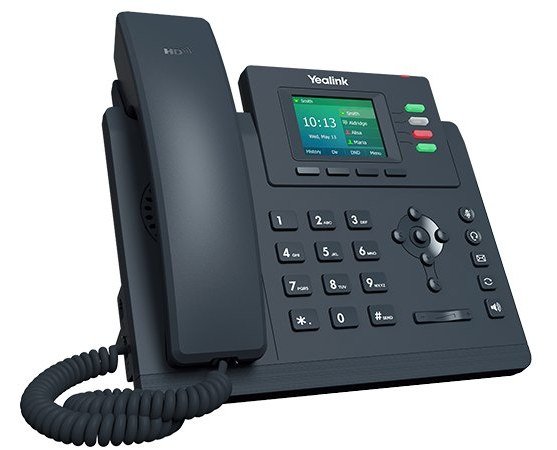
 Yealink 1302026 (W78P) 2.4″ TFT High‑Performance SIP DECT Phone System, Up to 10 Handsets and 20-Calls
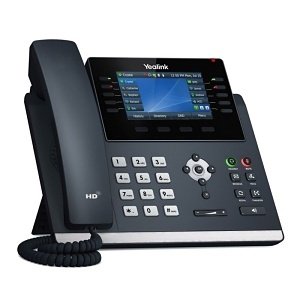 Yealink 1301203 SIP-T46U Wall Mountable Desktop IP Corded Phone, Classic Gray
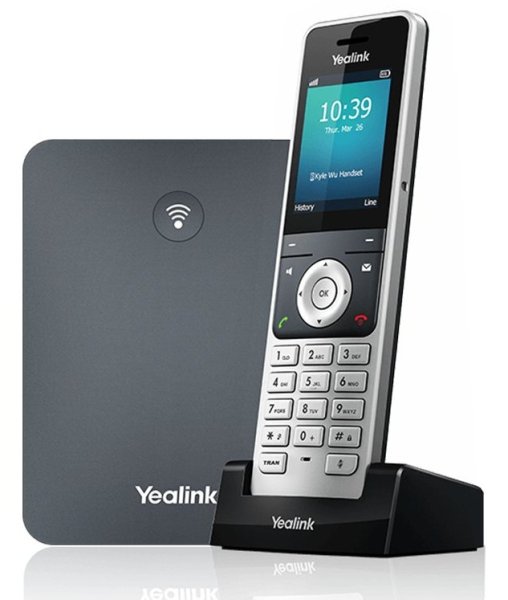
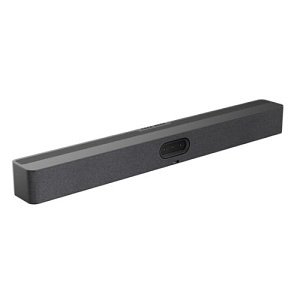 Yealink 1206707 All-in-One MeetingBar A50 with CTP25 Touch Console Android
 Yealink 1206709
 Yealink 1303172 Room Panel E2 Meeting Room
Thinking about replacing your phone system? Tell us how many people and locations, and we will check your network and numbers and send a written quote.
